AI App Builder for Startups: Shrink the Launch Surface
Orkosi Team · · 11 min read

The bottleneck in launching software has moved, and most founders are still optimising for the old one. If you use an AI app builder for startups, code is no longer the constraint: agents can produce a working, deployed product faster than you can write the spec for it. What stays expensive is everything that happens after the deploy, which means the discipline that engineering capacity used to force on you now has to come from you.

The bottleneck moved: building is cheap, launching isn't
What changed in 2025–2026
Three years ago, a four-screen MVP with Stripe billing and one integration was a month of contract work or a founding engineer's full attention. Scope was rationed by what a team could ship before the runway ran out, and that rationing did a lot of quiet strategic work for founders.
Agent-based builders removed the rationing. When a prompt plus a few iterations produces an admin dashboard, role-based permissions and a second integration, there is no natural point where someone says "we can't afford that this quarter". The absence of friction reads as permission.
The new scarce resource
The scarce resources now are attention, explanation and support. Every screen you ship is a screen you have to describe on a landing page, demo on a call, document, fix when it breaks and defend when a user says it is confusing.
Paul Graham's list of startup-killing mistakes includes launching too late and building for imaginary users. AI builders make both failure modes cheaper to commit, not harder: you can now spend six weeks perfecting features that no real user has asked for, and the build cost will look reasonable the whole time. The bill arrives later, as support load, confused positioning and a product you are afraid to change.
My position: for a first launch, the right question is not "what can the agents build?" but "what is the smallest thing I can put in front of a paying user and actually stand behind?"
Define it: launch surface, and how to count yours
A working definition
Launch surface is every element a user can touch and you must explain, support, bill for and keep working. If it appears in the product, in your pricing page or in a sales conversation, it counts.
Launch surface area is not the same as lines of code or build hours. Two products with identical codebase size can have wildly different surfaces, because surface is measured in obligations, not in files.
The five units of surface: screens, integrations, user roles, promises, support paths
Count your MVP launch scope in five units:
- Screens: any distinct view with its own state and its own empty state.
- Integrations: any third-party system you read from or write to, including payment, email and calendar.
- User roles: any distinct permission set, including unauthenticated visitors who can act.
- Public promises: any capability claimed on your marketing site or pricing page.
- Support paths: any channel a user can reach you through and expect a reply.
Here is the same scheduling product counted twice. The left column is the version a founder typically describes to an AI builder on day one. The right column is a one workflow MVP.
| Surface unit | Broad launch | Narrow launch |
|---|---|---|
| Screens | 14 (landing, signup, login, reset, dashboard, calendar, booking page, services, availability, client list, client detail, invoices, team, settings) | 2 (public booking page, owner console) |
| Integrations | 6 (Google Calendar, Outlook, Stripe, Zoom, SMS, email marketing) | 1 (Stripe Checkout, hosted) |
| User roles | 4 (owner, staff, client, admin) | 1 (owner; clients book without an account) |
| Public promises | 5 (two-way sync, SMS reminders, team scheduling, invoicing, reports) | 1 (take paid bookings on a link) |
| Support paths | 2 (live chat, help centre) | 1 (email address in the footer) |
| Total | 31 | 6 |
Thirty-one units is roughly five times the explanation, five times the failure modes and five times the monthly cloud footprint. Each integration and managed service carries its own recurring charge on AWS pricing, so surface area is also a line item, not just a cognitive load.
Count yours before you brief an agent. If the number is above ten, you are not building an MVP, you are building a version 2 without the version 1 data.
Why broad launches underperform (and what the evidence says)
No market need beats bad code as a killer
Post-mortem data is consistent and uncomfortable: startups die from demand problems far more often than from delivery problems. CB Insights' analysis of why startups fail puts running out of cash and no market need at the top, with pricing, competition and team issues close behind. "We could not build it" is rarely the headline cause.
Marty Cagan's framing of the four big risks is useful here: value risk (will anyone want it), usability risk (can they figure it out), feasibility risk (can we build it) and business viability risk (does it work for our business). Agent builders attack feasibility risk, which was already the cheapest of the four to retire. Shipping twelve extra screens buys you confidence about the risk that was least likely to kill you.
Feature breadth vs activation
Breadth also fights usability. Nielsen Norman Group's definition of usability puts learnability and task completion at the centre: a first-time user either finishes the job or leaves. Feature count does not appear in that definition, and in practice it works against it, because every extra entry point is a chance to pick the wrong one.
A narrow product has one obvious next action on every screen. That is an activation advantage, not a limitation, and it is the main reason I think product launch scope creep costs you conversion rather than buying it.
The one-workflow launch: pick the job, not the product
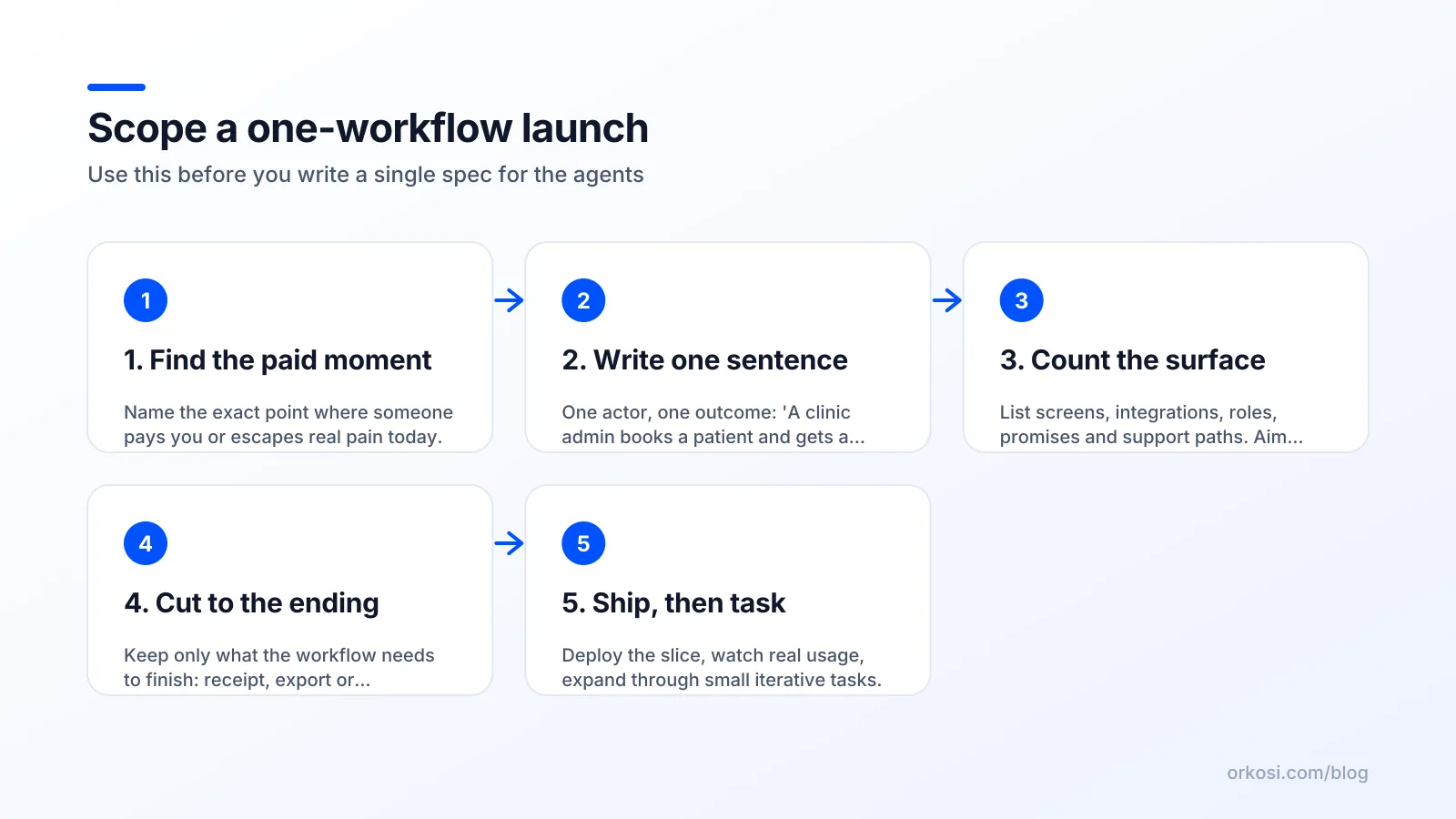
Find the paid moment
Start from the moment money changes hands or acute pain disappears. Not the moment a user signs up, not the moment they configure settings: the moment value is delivered.
For a scheduling tool that moment is a confirmed, paid booking. For an invoicing tool it is a client paying an invoice. For an internal ops tool it is a report that someone currently builds by hand at 11pm on a Friday. Everything that does not sit on the path to that moment is a candidate for the cut list.
Write the workflow as a single sentence
Write it with an actor and an outcome, in one sentence, with no "and also".
"A yoga teacher shares a link; a student picks a slot, pays, and both get a confirmation."
That sentence is your spec, your landing page headline and your scope boundary. If a feature request does not make that sentence truer or faster, it waits. Founders who skip this step end up briefing agents with a product category ("a scheduling app") instead of a job, and category briefs always generate 30-unit surfaces.
The 'what happens after' test
A workflow must terminate somewhere a user can see: a receipt, a confirmation email, an exported file, a notification, a status change. Dangling workflows are the most common defect in AI-built MVPs, because agents will happily build a form that saves data to a table nobody ever looks at.
Apply the test literally. Follow the single sentence end to end on the deployed product, on a phone, as a stranger. If the last step is "the data is now in the database", the workflow is not finished and no amount of extra screens will fix it.
Cut list: what to leave out of version one
Things to cut without guilt
- Admin dashboards. You are the admin, and your database console plus a read-only query is enough for the first 50 customers.
- Team roles and permissions. Multi-user is a pricing feature for later; it doubles your auth logic and triples your test matrix today.
- Onboarding tours. A tour is usually an apology for a confusing screen. Fix the screen.
- The second integration. The first integration teaches you whether integrations matter at all.
- Dark mode, theming, localisation. Real preferences, zero effect on whether the job gets done.
- A mobile app alongside a web app. A responsive web build reaches everyone; native shells can follow once retention exists.
- Analytics dashboards for users. Almost nobody looks at these before they have a month of their own data in the system.
These are safe cuts because they are reversible. Agents can add a permissions model in week six on top of real usage data, and the later version will be better informed than the speculative one.
Things that look optional but aren't
- Authentication done properly. Retrofitting identity across existing data is one of the few genuinely painful migrations.
- Billing from day one. Payment is the only honest signal of value, and bolting it on later means re-deciding your pricing model with customers already in the system.
- Backups and a restore you have actually tested. Reversibility is the whole argument for launching narrow; losing data removes it.
- Error logging and alerts. Without them you learn about outages from the customer who left.
- One visible support path. An email address in the footer is enough, but something must be there.
The dividing line is reversibility and trust. Cut anything you can add later without migrating data or breaking a promise; keep anything whose absence is discovered by a customer rather than by you.
How an AI app builder for startups supports a narrow launch: tasks, templates and credits
Spec one workflow, then iterate in tasks
The operational version of this on Orkosi is straightforward: you describe the single workflow in that one-sentence form, agents write the code and deploy it on AWS, and then you expand through tasks once real users have touched it. Because iteration is task-based, "add staff accounts" becomes a decision you make in week five with evidence, not a line item you guess at in week one.
Agent work consumes credits, which is a useful second forcing function. A 31-unit surface costs more to build and more to keep iterating on than a 6-unit one, and you can see that in your plan usage; the published plans and credit allowances are on the Orkosi pricing page. Honest trade-off: credits also mean exploratory rebuilds are not free, so vague briefs are expensive. A sharp one-sentence spec is cheaper than three rounds of "actually, make it more like Calendly".
Choosing a template that matches the surface
Template choice sets your starting surface, so pick the smallest one that contains your paid moment. The SaaS / Web App template fits workflows with accounts and subscriptions; Online Store fits products and checkout; Website fits launches where the real job is explaining and capturing demand before any app exists. The full list is on app templates, and the build and iteration mechanics are documented in the Orkosi docs.
Orkosi is one option among several agent builders, and it is not the right tool for every case: if your product's core is a novel algorithm or a hardware integration, you will spend more time steering agents than you save. Where it earns its keep is standard-shaped software with hosting, billing, brand and SEO tooling attached, which is most first launches. The current capability list sits on Orkosi features.
The honest trade-offs of launching narrow
When narrow is the wrong call
Narrow is wrong in three situations. First, enterprise sales: procurement reviews, SSO requirements and security questionnaires punish products with visible gaps, so breadth is table stakes rather than scope creep. Second, marketplaces and two-sided products, where a thin side kills liquidity and you cannot launch half a network. Third, replacement purchases, where a buyer must migrate off an incumbent and will not do it for 60% of their current workflow.
There is also a real risk that a single workflow reads as a feature rather than a product, which caps what you can charge. If your one workflow is genuinely a $9 utility, your narrow launch is correct and your market is small; those are two different problems and worth separating early.
How to avoid looking unfinished
Narrow looks deliberate when you name the niche. "Scheduling for solo yoga teachers" is a product; "a scheduling app, currently without team support" is a beta. Same code, different read.
Three tactics that work: state who it is for in the headline, publish a short and specific roadmap so gaps look chosen, and price for the outcome rather than the feature count. Then widen when you see the same request from unrelated customers three times, when a deal is lost explicitly on a missing capability, or when support volume concentrates on one absent workflow.
FAQ
How small is too small for a launch?
Too small is when the workflow does not terminate in something a user can see or receive. If a stranger can complete the job end to end and get a receipt, confirmation or export, the product is launchable even at two screens. Below that, you have a demo. The practical floor is one complete job, not a minimum number of features.
Should I launch without billing if I'm not sure people will pay?
No, launch with billing even if you discount heavily or sell a tiny first tier. Payment is the only reliable signal that the workflow is worth something, and retrofitting billing later means re-architecting around pricing decisions you have already set expectations on. Free pilots are fine, but build the payment path now and keep the price list short.
What if competitors already have more features?
They will, and matching them is the fastest way to lose. Competing on breadth means competing on their strongest axis while you have no customers, no data and no distribution. Pick a segment their generality serves badly and be visibly, specifically better for that segment. Breadth is a late-game advantage; specificity is an early-game one.
How fast should I add the second workflow?
Wait for evidence, which usually takes four to eight weeks of real usage. The trigger is repetition: the same request from unrelated customers three times, or support volume clustering around one missing step. Adding workflows on schedule rather than on signal is how product launch scope creep restarts after launch, and it is harder to undo once customers depend on the extra surface.
Pick one workflow, count your surface, and start free to have agents build and deploy that version this week. If it works, you can widen it in tasks on whichever plan fits your usage.