Cost of Running a SaaS on AWS: The Bill Isn't Compute
Orkosi Team · · 12 min read

The claim: on a small SaaS bill, compute is the minority
The cost of running a SaaS on AWS is rarely dominated by the servers. For a pre-scale product, the EC2 or Fargate line is usually smaller than the combined total of networking charges, managed-service minimums, log ingestion and the idle redundancy you copied from a reference architecture. Founders budget for compute and get surprised by plumbing.

By "small SaaS" I mean a few hundred to a few thousand registered users, one or two environments, a single region, a relational database under 100 GB, and traffic that fits comfortably on one or two small instances. At that size your application does not need much CPU. What it needs is a dozen always-on AWS components, each with its own meter.
This article audits the line items that actually show up: NAT gateways, data transfer, load balancer hourly floors, RDS minimums, CloudWatch logs, and the debris of snapshots and orphaned volumes. Then it ranks the fixes by payoff per hour of work, and separates the decisions that are cheap to reverse from the ones that set your bill for years.
How to read an AWS bill like an operator
Do not start with blog-post benchmarks, including this one. Start with your own bill. The whole diagnosis takes about ten minutes in Cost Explorer.
Cost Explorer grouped by service, then by usage type
Open Cost Explorer, set the date range to last full month, set granularity to monthly, and group by Service. Write down the top six services and their share of the total. That tells you whether you have a compute problem, a database problem or a networking problem.
Now change the grouping to Usage Type and filter to your biggest service, one at a time. This is the step most people skip, and it is the one that produces decisions.
Why 'usage type' is where the truth lives
Usage type separates charges by their unit: instance hours, GB-month of storage, GB processed, requests, IOPS. Two bills with identical "EC2-Other" totals can have completely different causes, because EC2-Other quietly contains EBS volumes, snapshots, NAT gateway processing and data transfer.
The unit tells you the lever. An hourly charge is fixed until you delete the resource, so optimisation means removing or consolidating. A per-GB charge scales with behaviour, so optimisation means moving the traffic somewhere cheaper or generating less of it. A per-request charge usually means a chatty client or a polling loop you forgot about.
Tag environments before you optimise anything
If staging and production are untagged, you are guessing. Apply a single tag key, something like env=prod or env=staging, to every resource, activate it as a cost allocation tag in Billing, then wait for the next day's data.
In most small accounts I have looked at, non-production environments account for 20% to 40% of the bill, and a meaningful part of that is a staging stack running 168 hours a week to serve about two hours of human attention. That is the cheapest saving available to you and it requires no architectural courage.
The line items that quietly dominate
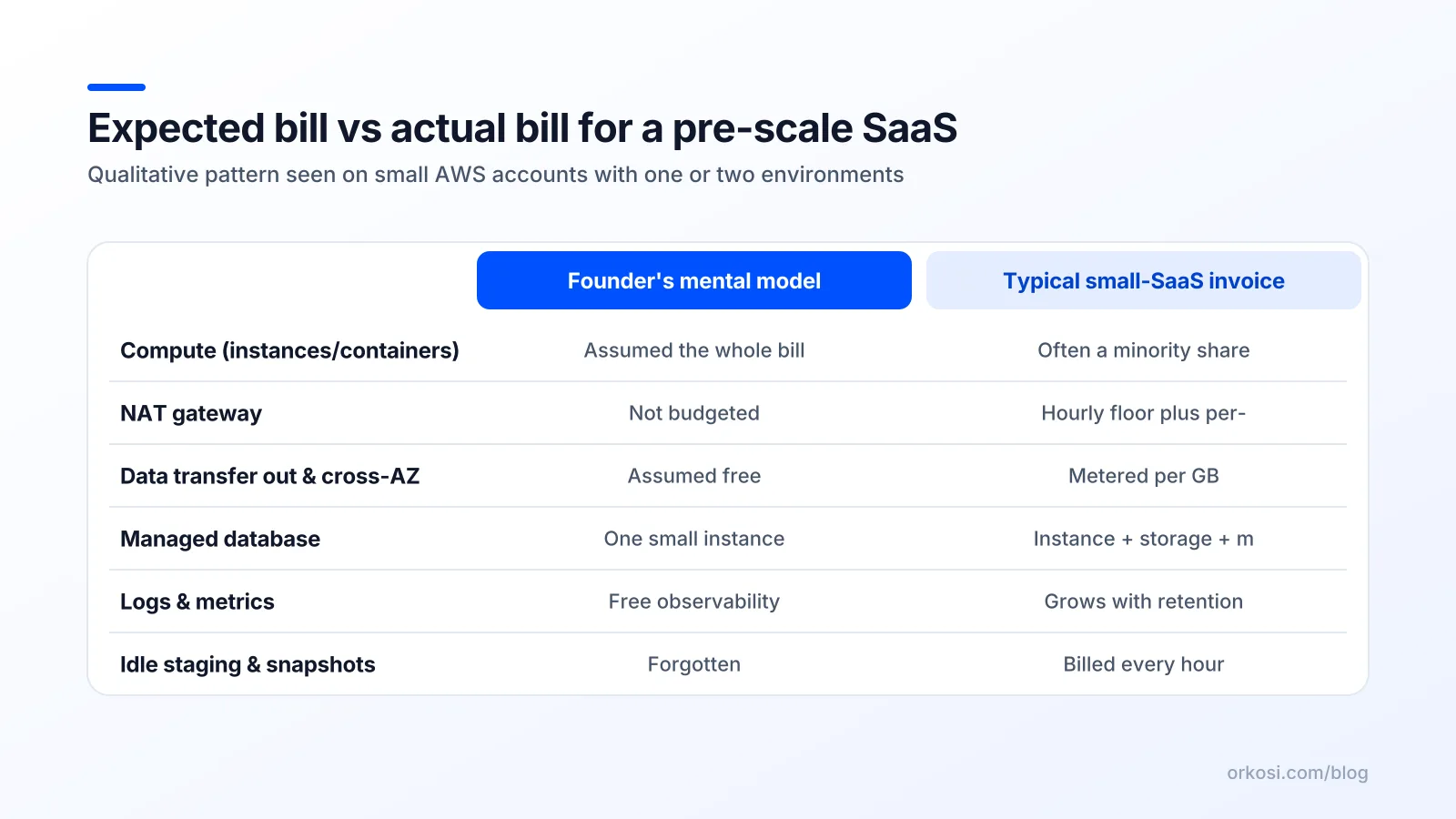
NAT gateways: hourly charge plus per-GB processing
A NAT gateway lets resources in a private subnet reach the internet without being reachable from it. It is billed two ways at once: an hourly charge for every hour the gateway exists, plus a per-GB charge for every gigabyte it processes, as documented on the Amazon VPC pricing page.
Both halves hurt small accounts. The hourly charge is comparable to running an always-on small instance that does nothing, and it applies per gateway, so the standard "one NAT per availability zone" pattern multiplies it. The per-GB charge applies to traffic you may not think of as internet traffic: container image pulls, OS package updates, and calls to S3 or other AWS APIs if you have not added VPC endpoints.
The AWS NAT gateway cost line is the single most common reason a founder with 300 users pays more for networking than for the application. Gateway VPC endpoints for S3 and DynamoDB carry no hourly charge and keep that traffic off the NAT; interface endpoints have their own hourly price, so they pay off only when they displace enough NAT processing.
Data transfer out and cross-AZ traffic
Inbound data is generally free. Outbound to the internet is metered per GB after a monthly free allowance, with rates declining in tiers as volume grows. The tables sit on the EC2 on-demand pricing page alongside instance rates.
Cross-availability-zone traffic is the subtler one. Traffic between instances in different AZs within the same region is charged per GB in both directions. A multi-AZ setup where an app server in AZ-a talks constantly to a database writer in AZ-b, or a load balancer that spreads requests across zones to backends that then chat with a cache in a third zone, generates a continuous metered stream that has nothing to do with your users.

Load balancers and their per-hour floor
An Application Load Balancer charges per hour plus per Load Balancer Capacity Unit, which bundles new connections, active connections, processed bytes and rule evaluations. For a small SaaS the LCU component is usually negligible and the hourly floor is the whole cost.
That floor is the point. One ALB for production is defensible. One each for production, staging, the marketing site and an internal admin tool is four hourly meters, and you could serve three of them from the same listener with host-based routing rules.
Managed database minimums and storage/IOPS
RDS and Aurora bill instance hours, storage per GB-month, IOPS or throughput depending on volume type, backup storage above your database size, and a roughly doubled instance charge if you enable multi-AZ. The structure is laid out on the RDS pricing page.
The managed database is usually the largest single line on a small SaaS invoice, and unlike compute it does not scale down when nobody is using the product. Multi-AZ doubles that floor to buy automatic failover. That is good engineering and it is also a real monthly cost for a product that has not yet earned an uptime commitment.
CloudWatch logs, metrics and retention
CloudWatch charges for log ingestion per GB, log storage per GB-month, and custom metrics per metric per month, with additional charges for API requests and dashboards. The details are on the CloudWatch pricing page.
Two defaults cause most of the damage. Log groups default to never expire, so you pay storage on debug logs from eighteen months ago forever. And verbose DEBUG logging in production, or an access log line per health check every five seconds, turns ingestion into a surprisingly large per-GB charge. High-cardinality custom metrics — one metric per customer, per endpoint — are the expensive version of the same mistake.
Snapshots, old AMIs and orphaned volumes
EBS snapshots, deregistered-but-not-deleted AMIs and volumes left behind by terminated instances are the classic hidden AWS costs for startups. Nothing alerts you, because they are working exactly as designed.
Check the EC2 console for volumes in the available state, snapshots older than your retention policy, and stale load balancer target groups. This category is pure waste: deleting it costs you nothing but a careful read of what you are deleting.
Why the AWS free tier lies about the cost of running a SaaS on AWS
The AWS Free Tier is honest about what it offers and misleading about what you will need. The 12-month allowances cover single small instances and a small single-AZ managed database; the always-free allowances cover modest Lambda invocations, DynamoDB capacity and a monthly quantum of data transfer out.
What it does not cover is the list above. There is no free NAT gateway and no free multi-AZ database. Sustained egress beyond the allowance is metered, and so is CloudWatch ingestion. A tutorial architecture costs nothing and a production architecture built from the same documentation costs real money, and the gap feels like a bug rather than a pricing tier boundary.
AWS Activate credits extend the illusion. A five-figure credit balance can hide your true cost shape for a year, and the bill arrives at exactly the moment you are trying to prove unit economics to an investor. Spend credits learning your cost shape instead of avoiding it: check Cost Explorer monthly while credits are covering it, and treat the credit as paid tuition in your own AWS bill breakdown.
The opinionated fix list, ordered by payoff per hour of work
Delete, don't optimise: idle environments and zombie resources
Highest payoff per hour, every time. Terminate the staging stack nobody uses, delete orphaned volumes and stale snapshots, remove the second NAT gateway in the AZ with no workload, and consolidate load balancers. If staging must exist, stop its instances and database outside working hours with a scheduled task; RDS instances can be stopped for up to seven days at a time, which fits a weekly cycle.
Collapse the network: do you need a private subnet yet?
This is the uncomfortable one. For a small SaaS, public subnets with tight security groups — no inbound rules except from the load balancer, no SSH open to the world — is a defensible posture that eliminates the NAT gateway cost entirely. The alternative is to keep private subnets and add gateway VPC endpoints for S3 and DynamoDB so routine traffic bypasses NAT.
Honest trade-off: private subnets plus NAT are a real security control and a common compliance expectation. If you are selling to enterprises or handling regulated data, keep them and pay. If you are nine months from your first SOC 2 conversation, the simpler network is a legitimate choice you can reverse later.
Put a CDN in front of everything static
CloudFront in front of your assets and your HTML shell converts per-GB origin egress into cached delivery, reduces load balancer LCUs and improves latency. It is one of the few interventions where the cost saving and the user-experience improvement point the same way.
Right-size logs before you right-size servers
Set retention on every log group (30 days is a reasonable default for application logs, 7 for access logs), drop health-check noise at the source, move DEBUG behind a flag, and audit custom metrics for cardinality. An afternoon here often beats a week of instance tuning.
Commit to savings plans only after the shape is stable
Savings Plans and Reserved Instances are genuinely good value, and they are a commitment against a footprint you might abandon next quarter. Wait until you have three months of flat usage, start with a one-year, no-upfront plan sized to your trough rather than your peak, and skip aggressive reserved capacity entirely while your architecture still changes monthly.
Things to skip at this stage: multi-region active-active, Kubernetes (EKS adds a control-plane hourly charge plus the nodes plus the complexity), service meshes, and per-customer isolated infrastructure. Each is a good answer to a problem you do not have.
Architecture decisions that set your bill for years
Serverless vs always-on containers: where the crossover sits
Serverless wins when traffic is spiky, low-volume or bursty, because you pay per invocation and per GB-second rather than per hour. Always-on containers win when traffic is steady and high enough to keep an instance busy, and when you have long-lived connections, large dependencies or cold-start-sensitive paths.
The practical crossover for a small SaaS sits well above typical early traffic, so Lambda or Fargate with scale-to-low is usually cheaper before product-market fit. The caveat: heavy use of vendor-specific services makes migration expensive later, so keep your business logic portable even if your runtime is not.
Managed database vs self-hosted: paying for sleep
Running Postgres yourself on a small instance is cheaper on the invoice and more expensive in your attention. The RDS premium buys backups, patching, failover and point-in-time recovery — and sleep.
My default: use the managed database, start single-AZ with automated backups, and turn on multi-AZ when a customer contract or a real outage makes it necessary. Self-host only if you have someone who genuinely enjoys that work and will still enjoy it at 3 a.m.
Choosing the boring region
Region choice is expensive to reverse and it affects every per-GB and per-hour rate on your bill. us-east-1 is usually the cheapest and gets features first; it is also the region with the most famous outage history. Pick the cheapest region that is near your users and your data-residency obligations, then stop thinking about it.
Cheap to reverse: log retention, instance size, savings plans, CDN adoption. Expensive to reverse: region, data model, deep coupling to proprietary services, and multi-tenancy design. Spend your design time on the second list.
Who watches the bill when agents build the product
When AI agents write the code and deploy it, infrastructure choices become part of the spec rather than an afterthought. Use that: write cost constraints into tasks the same way you write acceptance criteria. "Log retention 30 days", "no always-on staging environment", "serve assets through a CDN", "use gateway VPC endpoints instead of a second NAT gateway" are all reviewable instructions.
Orkosi runs this loop by default: you describe the product, agents build it, deploy on AWS and keep iterating through tasks, with hosting part of the platform rather than a separate project. The app templates start from a sane footprint for a SaaS or web app, which matters because the first deployment usually becomes the architecture nobody revisits for a year.
Be clear about the money, though. Orkosi plan credits (Starter at $20/month, Pro at $100/month, Enterprise at $245/month, with 1 credit equal to $0.01) pay for agent work on your product; see Orkosi pricing for current details. Where your own cloud account is involved, cloud spend is its own line and still deserves a monthly review.
Treat the AWS bill as a product metric. Put a Cost Explorer screenshot in your monthly review, set a billing alarm at roughly 1.5x expected spend, and file a task whenever a line item moves more than 20% without a corresponding increase in users. The Orkosi docs cover how deployments are structured if you want to reason about what your stack is actually running.
FAQ
What does it cost to run a small SaaS on AWS per month?
With a few hundred users, one region, one ALB, one small managed database and no NAT gateway, expect something in the low tens to low hundreds of dollars a month, dominated by database and load balancer hourly floors. Add private subnets with NAT in two AZs, multi-AZ RDS and unretained CloudWatch logs and the same application commonly lands in the $300 to $600 range. The variable is almost never user count at that scale; it is how many always-on components your architecture contains.
Why is my AWS bill high when I have almost no users?
Three causes account for most surprise bills: hourly charges for idle infrastructure (NAT gateways, load balancers, multi-AZ databases, EKS control planes), CloudWatch log ingestion and storage with no retention policy, and a duplicate non-production environment running 24/7. None of them scale with users, which is why the bill feels disconnected from your traffic. Group Cost Explorer by usage type and you will find them in under ten minutes.
Is a NAT gateway really necessary for a small SaaS?
Not necessarily. If your workloads need outbound internet access from private subnets and you have security or compliance requirements that mandate those subnets, keep it and add gateway VPC endpoints for S3 and DynamoDB to reduce the per-GB half of the charge. If you are pre-compliance and your only inbound path is a load balancer with tight security groups, running in public subnets without NAT is a reasonable, reversible trade-off.
Should I move off AWS to a flat-rate host like Hetzner or Fly.io?
For a pre-scale SaaS with predictable traffic and no enterprise procurement requirements, flat-rate hosts are genuinely cheaper, especially on egress, and the operational simplicity is real. You give up the breadth of managed services, the IAM model enterprise security reviews expect, and the migration path you would otherwise already be on at scale. My take: if your bill is mostly egress and always-on compute, benchmark the move seriously; if it is mostly managed database and you have no platform engineer, the AWS premium is buying something you would otherwise have to build.
Ready to find out what your own cost shape looks like? Start free and ship something small enough to measure, then check pricing when you know what your product actually needs.