Custom App for Small Business: Integrations Decide It
Orkosi Team · · 12 min read

A custom app for small business rarely dies because it was missing a feature. It dies because it became the fourth place somebody has to type the same customer name, and after six weeks nobody bothers. The feature list is not what predicts survival. The integration surface is.
Here is the one-line version: a custom app for small business stays in use past month six when it reads from the systems that already hold your records and writes back to at most one of them. Everything else is decoration.

The position: features don't kill custom small-business apps, orphaned data does
Orphaned data is data that exists only inside your new app and nowhere else in the business. A job status that lives in the app but not on the invoice. A customer note the accountant can't see. A booking that never reaches the shared calendar.
Orphaned data is expensive in a specific way: it creates reconciliation work. Somebody has to cross-check two lists and decide which one is true. In a six-person company that person is usually you, at 9pm, with two browser tabs open.
The cure is not more features. It is deciding, before a single screen exists, which existing system owns each piece of information, and committing to borrowing rather than duplicating it.
Your business is already a distributed system (you just didn't design it)
A distributed system is software whose state is spread across several machines that have to agree with each other. Your business is one of these. Stripe knows about payments, Shopify knows about orders, QuickBooks knows about the ledger, Google Workspace knows about the calendar. None of them talk to each other unless you make them.
What a 'system of record' means in a 6-person company
A system of record is the single place where a given fact is authoritative. If your accountant looks at QuickBooks and your app disagrees, QuickBooks wins, because that is the record the tax authority and the bank will see. For a small business the test is simple: if these two disagree, which one do I believe without arguing? Most small businesses have never written this down. It takes twenty minutes and changes what you build.
The four records almost every small business has
| Record | Usual system of record | What it authoritatively holds |
|---|---|---|
| Money in | Stripe, Square, a POS | Charges, refunds, payouts, fees |
| Books | QuickBooks, Xero | Invoices, bills, chart of accounts, tax |
| Customers and orders | Shopify, HubSpot, a spreadsheet | Order lines, fulfilment status, contact details |
| Time and comms | Google Workspace, Microsoft 365 | Calendar events, email threads, shared files |
Nearly every request for an internal tool for small business is actually a request to see two of these rows side by side, filtered to a view nobody's SaaS vendor offers.
Why the app you build is a view, not a vault
The useful mental model: your custom app should own exactly one new record and borrow the rest. For a plumbing business, the new record is the job: which van, which day, which parts, what the tech photographed on site. Nobody else holds that. For a design studio it is the project phase; for a clinic, the treatment plan.
Jobs, phases and plans are what you own. Customers, invoices and payments are borrowed.
Map the records before you spec a screen
Do this before you discuss buttons. It takes one page and one coffee.
A one-page record map you can fill in over coffee
List your entities down the left: customer, order, invoice, payment, job, appointment, inventory item. Across the top, three columns: owning system, does my app read it, does my app write it. One owning system per row. No "both".
Filled in for a two-van electrical contractor:
| Entity | Owning system | App reads | App writes |
|---|---|---|---|
| Customer | QuickBooks | Yes | No |
| Estimate | QuickBooks | Yes | No |
| Invoice | QuickBooks | Yes | Yes (one path, see below) |
| Payment | Stripe | Yes | No |
| Job | The custom app | Owns | Owns |
| Site photos | The custom app | Owns | Owns |
| Appointment | Google Calendar | Yes | Yes |
One owned entity. One write-back to accounting. One write to the calendar. That is a shippable scope.
The question that settles every argument: who owns this field?
When two people disagree about where a feature belongs, ask who owns the field. If the bookkeeper owns invoice numbers, the app does not generate invoice numbers. If Shopify owns fulfilment status, the app does not keep its own status enum that drifts out of sync by Thursday. This single question kills about a third of a typical feature list, which is the point.
Spotting the double-entry you're about to automate
Double entry here means the same fact typed twice by a human: customer details into the quote and again into QuickBooks, job address into the calendar and again into the van's paperwork.
Count the instances per week. Under roughly 20, a form that copies to the clipboard is enough. Over 100, you have found your integration. That number, not enthusiasm, is what should justify the work.
Four integration patterns, and the honest trade-offs of each
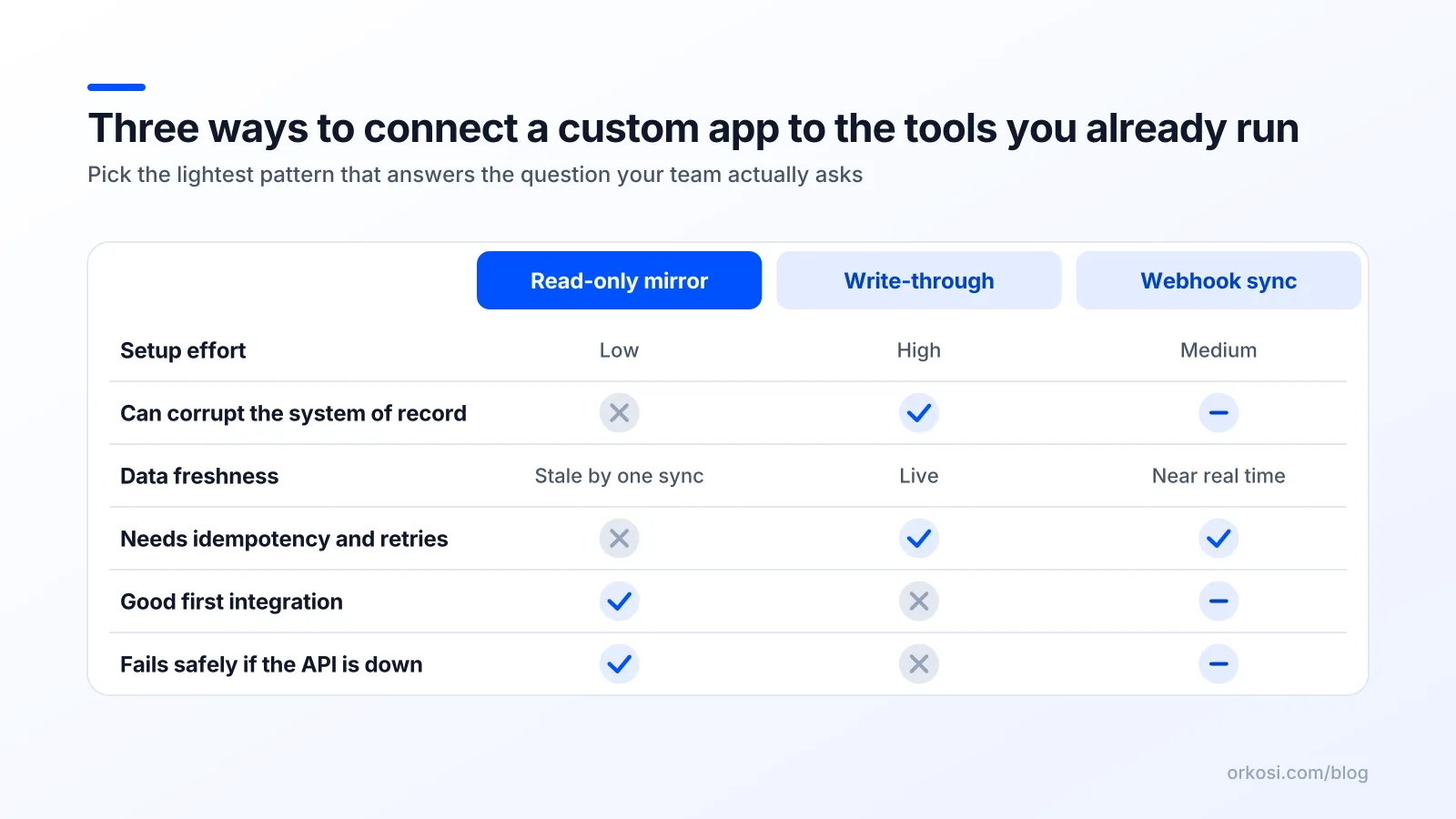
Read-only mirror
Your app pulls data on a schedule and displays it. Nothing is written back. Use it for dashboards, job sheets that show the customer's balance, or a picking view over Shopify orders.
What breaks: staleness. Someone refunds an order and your app shows the old total for twelve minutes. The failure mode is mild confusion, and no money moves incorrectly. This is why you start here.
Write-through
Your app writes directly to the external system when a user acts: create the invoice, mark the order fulfilled. Use it when the write is user-triggered, visible, and rare enough that a human notices failure.
What breaks: partial writes and double writes. The network times out, your app retries, and now there are two invoices. The fix is mandatory, not optional: idempotency keys, so a repeated request is recognised as the same request. Stripe's idempotent requests documentation describes the standard approach, and the same discipline applies to any payments or accounting write.
Webhook-driven sync
The platform pushes events to your app when something changes, so you don't poll. This is the backbone of webhook sync for small business software: Shopify tells you an order was paid, Stripe tells you a charge succeeded, your app reacts.
What breaks: duplicates and ordering. Stripe's documentation is explicit that webhook delivery is at-least-once and endpoints must tolerate duplicate and out-of-order events. If your handler creates a job record per event without deduplicating on the event ID, you will ship a bug that only appears under load.
Human-in-the-loop export
The app produces a file or a batch, a person reviews it, then it is imported or actioned. Deliberately manual. Use it for month-end, payroll adjustments, anything where a mistake costs money.
What breaks: nothing automatically, which is the feature. The failure mode is that somebody forgets, so pair it with a calendar reminder and a counter on the dashboard.
The opinionated call: start read-only, earn the right to write. Ship the mirror, let the team use it for two weeks, then add exactly one write path. The moment you write into a system of record, retries and idempotency stop being nice engineering and start being a bookkeeping requirement.
The integration tax nobody budgets for
This is the honest counterargument to "just build it". Integration is where the ongoing cost lives, and it is not small.
OAuth, app reviews and the two-week wait
Every "Connect your account" button is an OAuth 2.0 authorisation-code flow: redirect, consent screen, authorisation code, token exchange, refresh token stored securely and rotated. That is a day of work the first time and a recurring source of "it logged me out" tickets.
Then there is the gate before it. Intuit's QuickBooks Online get-started guide walks through a developer account, a sandbox company and separate production keys. If you want to integrate QuickBooks with a custom app and distribute it, expect paperwork and review time between working code and working-in-production code. Budget calendar weeks, not hours.
Rate limits and the 'it worked in testing' problem
Your test store has 40 orders. Your real store has 40,000. Shopify's rate limit documentation sets out a leaky-bucket and calculated-cost model, and sync jobs that ignore it get throttled the first time you backfill history.
If you connect a custom app to Shopify, the backfill is the dangerous part, not the steady state. Pagination, exponential backoff and a resume cursor need to exist before the first full import, otherwise your import dies at 60% and you cannot tell what landed.
Webhooks are at-least-once, so your app must be idempotent
Store the provider's event ID, check it before processing, and make every handler safe to run twice. Treat ordering as unreliable and fetch current state from the API rather than trusting the event payload to be the latest word.
Versioned APIs mean maintenance forever
Platforms version their APIs and deprecate old versions. Something you built in March will need attention within a year or two, usually a changed field name or an endpoint that now requires an extra scope. This is predictable, unglamorous work, and it is the reason "just build it" is sometimes the wrong answer.
When not to integrate (the unpopular half of the argument)
Low-volume workflows where CSV wins
Heuristic: under about 30 records a week, a weekly CSV export beats a sync. A human moving 25 rows on a Friday is ten minutes and zero maintenance. A sync moving 25 rows is a permanent dependency on someone else's API version policy.
Integrations you should buy instead of build
Email sending, payment checkout, accounting itself, calendar scheduling. These are commodity surfaces with mature products and staff on call. Build the thing nobody sells you, which is the view of your own operation.
The one integration that is almost never worth it first
Accounting write-back. Pushing invoices or journal entries into QuickBooks or Xero as your first integration is the highest-blast-radius choice available: errors cost money, confuse your accountant, and are tedious to unwind. Read from accounting first, write to it in month three, and keep the human-in-the-loop export as the escape hatch.
And the always-available option: do nothing. If the record map shows fewer than three real double-entries, a shared spreadsheet and a saved filter may be the correct answer this quarter.
How agent-built software changes the integration math

Integrations as iterative tasks, not a phase
Traditional builds force you to scope every integration up front, because a change order costs money and goodwill. On Orkosi, agents build, deploy to AWS and keep iterating through tasks, so "add a read-only Shopify order view" is a task you file in week three, after the team has actually used the app. You get to choose integrations based on observed pain instead of guesses made in a kickoff meeting. See the app templates for the starting shapes, from SaaS web app to online store.
The trade-off is real: agent-built integrations still have to clear the same OAuth, review and rate-limit gates as hand-written ones. Nothing shortens a platform's app review queue.
Why owning the code matters when an API version ships
When a provider deprecates an endpoint, you need access to the code to fix it. Owning the codebase means the fix is a task, not a vendor negotiation. That is the structural argument for building over using a locked no-code connector, and it is worth more in year two than year one. The Orkosi docs and feature overview cover how deployment and iteration work in practice.
What to spend credits on first
Spend on the owned record and the read-only mirror. Those two deliver most of the usable value and carry the least risk. Hold budget back for the write path, because that is where retries, logging and alerting consume real effort. Credit costs scale with how much iteration you ask for, so check current plans and credit allowances on the pricing page rather than guessing.
A two-week build order for your first integrated app
Days 1-3: one record, one screen, no sync
Build the owned entity (job, project, appointment) with create, edit and list. No external API calls at all.
Acceptance test: one real staff member logs five real records without asking a question.
Days 4-7: read-only mirror of the system of record
Add OAuth connection and a scheduled pull of the one external entity you need most, usually customers or orders. Display only.
Acceptance test: a record changed in Shopify or QuickBooks appears correctly in the app within the sync interval, and the backfill completes without hitting rate limits.
Days 8-11: one write path with idempotency
Pick the single highest-value write. Implement it with an idempotency key, a retry policy with backoff, and a visible status on every attempt.
Acceptance test: trigger the write twice in quick succession and confirm exactly one record is created in the target system. Then pull the network cable mid-write and confirm recovery.
Days 12-14: webhooks, alerts and a manual fallback
Replace polling with webhooks where available, deduplicate on event ID, and route failures to an alert someone actually reads.
Acceptance test: replay the same webhook three times and confirm one effect. Before go-live, confirm the manual fallback exists: a CSV export and a documented way to do the task by hand for a day if the integration is down. If that fallback does not exist, you are not ready to launch.
FAQ
How much does a custom app for small business cost once integrations are included?
Budget separately for the app and the integrations. The owned record and screens are the cheap part; each external connection adds authorisation work, sync logic, error handling and ongoing maintenance when APIs version. A reasonable planning rule is that your first integration costs as much as the app's core, and each subsequent one costs less. For agent-built pricing and credit allowances, see Orkosi pricing.
Can an AI agent connect my app to QuickBooks or Shopify?
Yes, agents can write and deploy the integration code, including OAuth flows, webhook handlers and retry logic. What agents cannot do is skip the platform's prerequisites: you still need a developer account, sandbox credentials and, for production access, whatever review the provider requires. Intuit documents those steps in the QuickBooks Online get-started guide. Plan for the queue, not just the code.
What happens to my integrations if the platform changes its API?
Something will need changing, usually within a year. Because you own the code on Orkosi, the fix is a task you file rather than a ticket you wait on. Reduce exposure by subscribing to each provider's developer changelog, pinning API versions explicitly, and keeping the human-in-the-loop export so the business can keep operating for a day with the integration switched off.
Should my custom app store a copy of customer data from Stripe or Shopify?
Store the minimum: an external ID plus any field you genuinely display or filter on, refreshed from the source. Do not store card data or full payment details; let the payments platform hold those. Treat your copy as a cache that can be rebuilt, never as the authoritative record, so a disagreement always resolves in favour of the system of record.
Map your records this week, then build the one screen nobody sells you: start free on Orkosi and file the integration as a task once your team has used the app for a fortnight. Check pricing and credits before you plan the write path, since that stage consumes the most iteration.