Launch a SaaS Product Checklist for Week One, Not Day One
Orkosi Team · · 13 min read

Most advice on how to launch a SaaS product checklist-style is organised around the wrong hour. You get sixty items, fifty-five of which concern the moment before you flip the switch: favicon, meta description, a founder story, a waitlist email with a nice header image. Almost all of it is reversible in minutes. Meanwhile the things that actually cost you users — a payment webhook you never tested, an error you can't see, a support inbox nobody is watching — get three bullet points at the bottom.
This piece inverts that. Three hard gates before you ship, then seven days of structured work after go-live. That's the whole argument.

The launch checklist industry has the timing wrong
Pre-launch items are cheap; post-launch items are expensive
A pre-launch mistake is almost always a cheap mistake. Wrong headline? Change it, redeploy, done in four minutes, and the twelve people who saw the old one do not remember it. Missing testimonials section? Add it on Thursday.
Post-launch mistakes compound. If you didn't define a signup event before traffic arrived, you cannot retroactively learn how many people bounced at step two of onboarding on launch day. That data does not exist. If your Stripe webhook silently 500s, you have customers who paid and have no access, and you find out from the angriest one, forty hours later. The asymmetry is enormous and most SaaS launch checklist templates ignore it entirely.
What a launch actually is: the start of a feedback loop
A launch is not the release of a finished artefact. It is the moment you first get to compare your model of what users want against what they do. Everything that makes that comparison legible — events, logs, alerts, a support channel — is high value. Everything that makes the artefact prettier on the day is low value, because you will change it in week two anyway based on what you learn.
So: three gates, then a week of work. The gates are not negotiable. The week is.
The only three things that must be true before you press publish
Someone can pay you and you'll know about it
Test the full payment path, not the checkout redirect. A redirect that lands on a success page proves almost nothing: the critical step is your server receiving and correctly handling the confirmation event. Stripe is explicit that payment confirmation belongs server-side via webhooks, because the client can close the tab, lose signal, or never load the redirect at all (Stripe Docs: Webhooks).
Concretely, before launch: run one real-mode payment with your own card, confirm the webhook fires, confirm your database records entitlement, confirm the user sees the paid state after a hard refresh, then refund yourself. If any link in that chain is untested, you are not ready.
You can see errors without a user telling you
Minimum viable observability is two things: application logs you can actually search, and one alert that reaches your phone. Not a dashboard you promise yourself you'll check. An alert. A CloudWatch alarm on 5xx rate wired to an SNS topic that emails or texts you is a thirty-minute job and the single highest-leverage pre-launch item on any SaaS go-live checklist (Amazon CloudWatch: Using alarms).
You can ship a change today, not next sprint
If deploying requires a person who is on holiday, a manual build step you half-remember, or a three-hour CI pipeline, fix that before you launch. The entire value of launch week is a tight loop between learning something and changing something. A deploy path that takes a day caps your learning rate at one iteration per day.
Everything else waits: logo kerning, the /about page, email template design, a second pricing tier, dark mode. You will have better information about all of these on day five.
The honest exception: anything you promise about data handling has to be true at launch, not patched later. If you claim encryption at rest, deletion on request, or compliance with a specific regime, that must be real before the first signup. Regulated industries do not get a "we'll fix it in week two" allowance, and neither do you if you wrote it on the pricing page.
Day 1: instrument before you announce
The four events worth tracking on day one
Do not build an analytics taxonomy. Track four events:
| Event | Why it matters on day one |
|---|---|
signup_completed |
Denominator for everything else |
core_action_completed |
Did they get to the thing the product does? |
payment_attempted |
Intent to pay, including failures |
payment_succeeded |
Revenue, and the gap vs. attempts |
The gap between signup_completed and core_action_completed is your activation problem. The gap between payment_attempted and payment_succeeded is your billing problem. Those two numbers will drive most of week one. Add more events later, when you have a question that needs them.
Uptime and error alerts that actually page you
Two alarms, both routed to your phone:
- 5xx rate above a threshold over five minutes. Set it low. On day one you have little traffic, so a handful of errors is signal, not noise.
- Payment failures above zero in fifteen minutes. A declined card is fine. A webhook handler throwing is an emergency, and you want to know which within minutes.
Add a simple uptime check hitting a health endpoint from outside your infrastructure. An alarm inside the same region as the thing that is down will not always tell you about it.
Announce in waves, not all at once
Stagger the announcement. Ten people first (friends, beta users, the three customers who asked to be told). Watch for an hour. Then a hundred: your mailing list, a niche community, a Slack group. Watch for a few hours. Then the public channels on day two or three.
This is unfashionable because founders want the big-bang moment. The payoff is that your first three bugs are found by people who will DM you a screenshot rather than tweet about it. Waves also catch the kind of failure that only appears under concurrency, at a volume where you can still read every log line.
Day one don't-do list:
- No new features. The code that goes live is the code you tested.
- No infrastructure changes. Not a region move, not an instance resize, not a database migration.
- No pricing experiments. You have no baseline yet.
- No refactors, however small, while traffic is live.
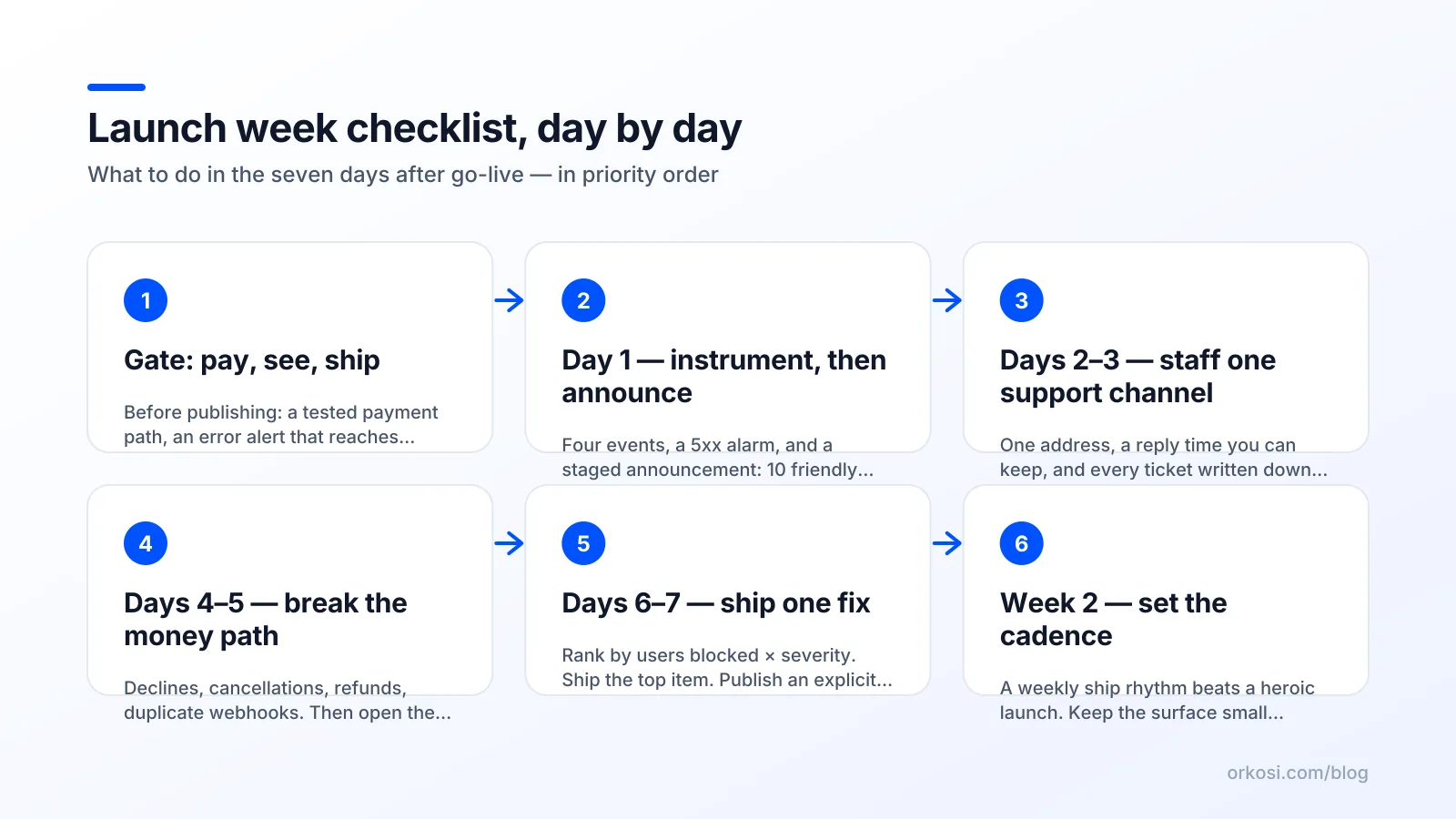
Days 2–3: your support channel is the product
One channel, visibly staffed, with a reply time you can keep
In the first week after launching a SaaS, response speed converts better than any feature you could build. A user who hits a wall at 9pm and gets a human reply at 9:14pm often becomes a paying customer and a reference. The same user, ignored until Monday, is gone and tells nobody why.
Pick one channel. One. A support email address or a chat widget, wired to push notifications on your phone. Publish a reply time you can actually keep — under four hours during the day is credible for a solo founder; "instant" is not — and then keep it. Two channels you answer slowly is worse than one you answer fast.
Reproduce, then fix — in that order
The temptation when a bug report lands is to guess and patch. Resist for ten minutes. Ask for three things every time:
Thanks for flagging. Three quick things so I can reproduce it: (1) the email on your account, (2) your browser and device, (3) roughly what time it happened, with timezone.
With those three fields you can find the request in your logs, see the actual stack trace, and fix the real cause rather than the symptom. Guessed fixes generate second bugs, which arrive on day four when you are already busy.
Log every question as a spec, not a complaint
Keep one running document. Each support conversation becomes a single line, written as a change rather than a grievance:
- "Can't find where to invite teammates" → Add invite button to the empty state of the team page.
- "Did my payment go through?" → Send a confirmation email on
payment_succeeded. - "What's the difference between the plans?" → Add a comparison table above the fold on pricing.
By day five this is a prioritised backlog built entirely from observed user behaviour — the cheapest product research you will ever do. It has an honest ceiling: it stops working somewhere past a few hundred users, when volume outgrows one founder's attention and you need categories, macros and someone else reading the inbox. Use it while it lasts.
Days 4–5: put billing and signup under real load
Test the failure paths, not the happy path
Most post-launch checklist SaaS guides reduce billing to "add Stripe." The happy path is the easy 20%. Work through the failure paths deliberately, using test cards for each scenario (Stripe Docs: Testing):
| Scenario | What should happen | Commonly broken |
|---|---|---|
| Card declined at checkout | Clear error, user can retry | Generic "something went wrong" |
| Card expires mid-subscription | Dunning email, grace period, then downgrade | Silent lockout with no email |
| User cancels | Access until period end, no surprise charge | Immediate cut-off, or no cancel UI at all |
| Refund issued | Entitlement revoked, invoice updated | Refunded user keeps full access |
| Webhook delivered twice | Second event is a no-op | User charged once, credited twice |
That last row bites hardest. Webhook endpoints must be idempotent, because events can be delivered more than once by design; Stripe's documentation is direct about handling duplicates rather than assuming exactly-once delivery (Stripe Docs: Webhooks). Store the event ID, check it before processing, and move on.
Card declines, refunds, cancellations and the dunning email
Write the dunning email now, before you need it. Three sentences, plain text, a link to update the card. Founders who skip this discover a month later that 8% of their subscriptions churned to expired cards nobody told the customer about.
Also: check the invoice email actually sends, and actually contains the right company name. Business buyers need it for expenses, and a missing invoice generates a support ticket per customer per month.
Check your actual cloud bill before it compounds
Open the bill on day four. Not day thirty. You are looking for whatever grows per user: AI tokens, object storage, data egress, log retention. A cost that is $3 at twenty users and linear is $150 at a thousand, and you would rather know the slope now than in a statement.
Set a budget alert with a threshold you would be unhappy to cross (AWS Budgets: Creating a budget). If you are running on a platform that bundles hosting into a plan, your version of this check is watching credit burn rate against your plan allowance instead; see Orkosi pricing for how the plan tiers and credits work.
Days 6–7: ship one fix, and write down what you refuse to fix
Pick the change that unblocks the most users, not the loudest one
Rank the week's findings by number of users blocked × severity. Not by who complained most forcefully, not by what is most interesting to build. An onboarding step where 40% of signups silently drop out beats a feature request from your most enthusiastic user, every time.
Ship exactly one meaningful change by day seven. One. A single, well-chosen fix you can verify against your day-one event data is worth more than five simultaneous changes you cannot attribute.

A 'not now' list is a launch artefact
Publish, internally at least, a list of things you have decided not to do and why. SSO. The mobile app. The integration three people asked for. Writing it down stops you relitigating the same decision every time someone mentions it, and gives you an honest answer for users: "Not in the next quarter, here's why, here's what I'm doing instead."
Keeping the launch surface small is a discipline, not a limitation. Every feature you add in week one is a feature you must support, document and keep working while you are also trying to learn whether the core thing works.
Set the cadence for week two
End the week by committing to a ship cadence: one visible improvement per week, announced to users. The cadence matters more than the size of each ship. It tells early customers the product is alive, and it forces you to keep the triage habit you built in days 2 through 5.
Where this checklist is wrong
If you're selling to enterprise, security review comes first
Enterprise and regulated buyers will not let you iterate into security. Access controls, audit logging, tenant isolation and data retention policy are architectural, and retrofitting them is a rewrite rather than a patch. For anything handling customer data, treat the OWASP Top 10 as the floor for a pre-launch pass: broken access control, injection, and security misconfiguration are not week-two work. If you're mid-market or above, push several items from my "can wait" pile back before go-live.
If launch is your only marketing moment
Some products get exactly one shot: a Product Hunt feature, a press embargo, a conference slot. If you genuinely have one moment and no mailing list to warm up again, polish matters more than I've allowed, and staging the announcement in waves is a luxury you can't afford. Be honest about whether this is really you, though. Most founders who believe they have one shot actually have a hundred small ones.
If you have no distribution, week one tells you nothing
Instrumentation produces signal only if people arrive. Thirty visitors over seven days gives you no activation rate, no conversion rate, and no statistically meaningful anything. If that's your situation, the problem is not your launch checklist, it's distribution, and the correct week-one activity is talking to potential users directly rather than staring at dashboards.
Running launch week when agents do the shipping
Tasks instead of sprints
When agents write and deploy the code, the economics of launch week shift. The constraint stops being engineering capacity and becomes triage quality. On Orkosi, you describe what needs to change as a task, agents implement and deploy it on AWS, and the day-seven fix can land in hours rather than at the end of a sprint — genuinely useful during the period when your backlog changes daily.
It also means fewer launch items are yours to wire from scratch. Hosting, billing, brand kit and SEO tooling live in the same place, so the "configure five services and hope they talk to each other" portion of a typical SaaS go-live checklist shrinks. The app templates cover SaaS, online store, website, image studio, mobile, desktop and video channel, which removes some of the day-zero scaffolding.
What stays human: judgement about what matters
The trade-off is real: faster shipping amplifies bad prioritisation as efficiently as good. If you cannot tell which of fifteen complaints represents forty blocked users, shipping in two hours instead of two weeks just gets you to the wrong place sooner. Reading support tickets, deciding what goes on the not-now list, and choosing the one day-seven fix remain entirely human work. The Orkosi docs cover how tasks and deployments work; pricing covers the plan tiers.
FAQ
What should be on a SaaS launch checklist at minimum?
Three things before go-live: a payment path tested end to end including the server-side webhook, error visibility with one alert that reaches your phone, and a deploy path you can use the same day. Everything else — copy, design polish, secondary pages — can be changed after launch in minutes. The exception is any data-handling or compliance promise you've already made publicly.
How long should the first week after launch take — full time?
Treat days 1 through 3 as full time, including evenings for support coverage, then taper. Days 4 and 5 are a few focused hours on billing failure paths and cost checks. Days 6 and 7 are triage plus shipping one fix. Blocking out the first three days properly is what makes the rest manageable.
Should I launch without analytics if I'm in a hurry?
No, but you need far less than you think. Four events (signup, first core action, payment attempted, payment succeeded) take under an hour to add and cannot be reconstructed afterwards. Launch day traffic is unrepeatable; a missing event means that cohort is permanently invisible. Skip the full taxonomy, not the four events.
What's the first thing to fix after launch?
Whatever blocks the most users, weighted by severity, not whatever generates the loudest complaint. Usually that is a step in signup or onboarding where people silently drop out, which is why day-one event tracking matters. Verify the fix against the same metric you used to find it.
Pick three gates, run seven days, and keep the ship cadence you set at the end of week one. If you want the hosting, billing and deploy path handled while you focus on triage, start free or compare the plans and credits.