Launch a SaaS Product Checklist You Can Finish in a Day
Orkosi Team · · 13 min read

Most of what you have read about launching software was written for a company with a release manager. If you are one or two people shipping a product built by agents, the only useful launch a SaaS product checklist is one you can finish between breakfast and dinner. Everything else is a Thursday task wearing a launch costume. What follows is the seven-gate version I would run before letting the first paying stranger in, the items I skip on purpose, and the cost of each skip.

The 80-item launch checklist is borrowed from someone else's company
Where these lists come from
Open any popular SaaS launch checklist and you will find press embargo timing, an analytics event taxonomy, a load test plan, legal review of marketing claims, a sales enablement deck, and a launch tier definition. Those items are real. They are also artifacts of a go-to-market function: a product marketer, a QA engineer, a release manager and a legal partner, coordinating a dated announcement across several teams.
Copying that list onto a two-person project does not import the discipline. It imports the overhead without the people who make the overhead pay off. A list designed to synchronise twelve humans takes three weeks when run by one, and most of those weeks go to items that would not have hurt you if they had been missing.
Why length feels like safety
Long checklists feel like risk management because they are legible. You can show someone sixty-two spreadsheet rows and look serious. But a checklist only reduces risk if each item maps to a failure you can name, and if completing it is cheaper than recovering from that failure.
So here is the thesis: a pre-launch checklist for SaaS should be sized to one working day, and every item must pass a single test. If an item fails the test, it is not a launch item. It is work you will do next week with better information, because by then users will tell you which parts actually matter.
The test: does this item block money, trust, or your ability to fix things?
Three gates, not three categories
Money. Can a stranger who has never met you pay you and immediately get the thing they paid for? If the answer involves you doing anything manually, you do not have a product, you have a concierge service with a signup form.
Trust. If someone reads your landing page, pricing page, emails and privacy notice, is every claim true, and is their data handled the way you said? Trust failures are not bugs. They are the one category of launch mistake a later feature cannot repair.
Fixability. If the app breaks at 2am, do you find out without a customer telling you, and can you ship a fix the same morning without a rebuild? Launch is not the promise that nothing breaks. It is the promise that breakage is cheap.
Everything else is a post-launch task
Items commonly mislabeled as launch-blocking:
| Item | Why it feels urgent | Why it is not |
|---|---|---|
| Analytics dashboard with funnels | "I need to measure the launch" | With 10 users you read the database directly |
| In-app onboarding tour | "People will get lost" | At this volume you onboard them personally and learn more |
| Blog with three posts | "SEO takes time" | True, which is why starting on day 8 costs you nothing |
| Product Hunt asset pack | "The launch needs a launch" | Launching to strangers before your first 10 users is the actual risk |
| Load testing | "What if it goes viral" | You have zero concurrent users; test when you have 500 |
None of those block money, none break trust, none affect your ability to fix things. They go on the 30-day list further down.
The one-day launch checklist (7 gates)
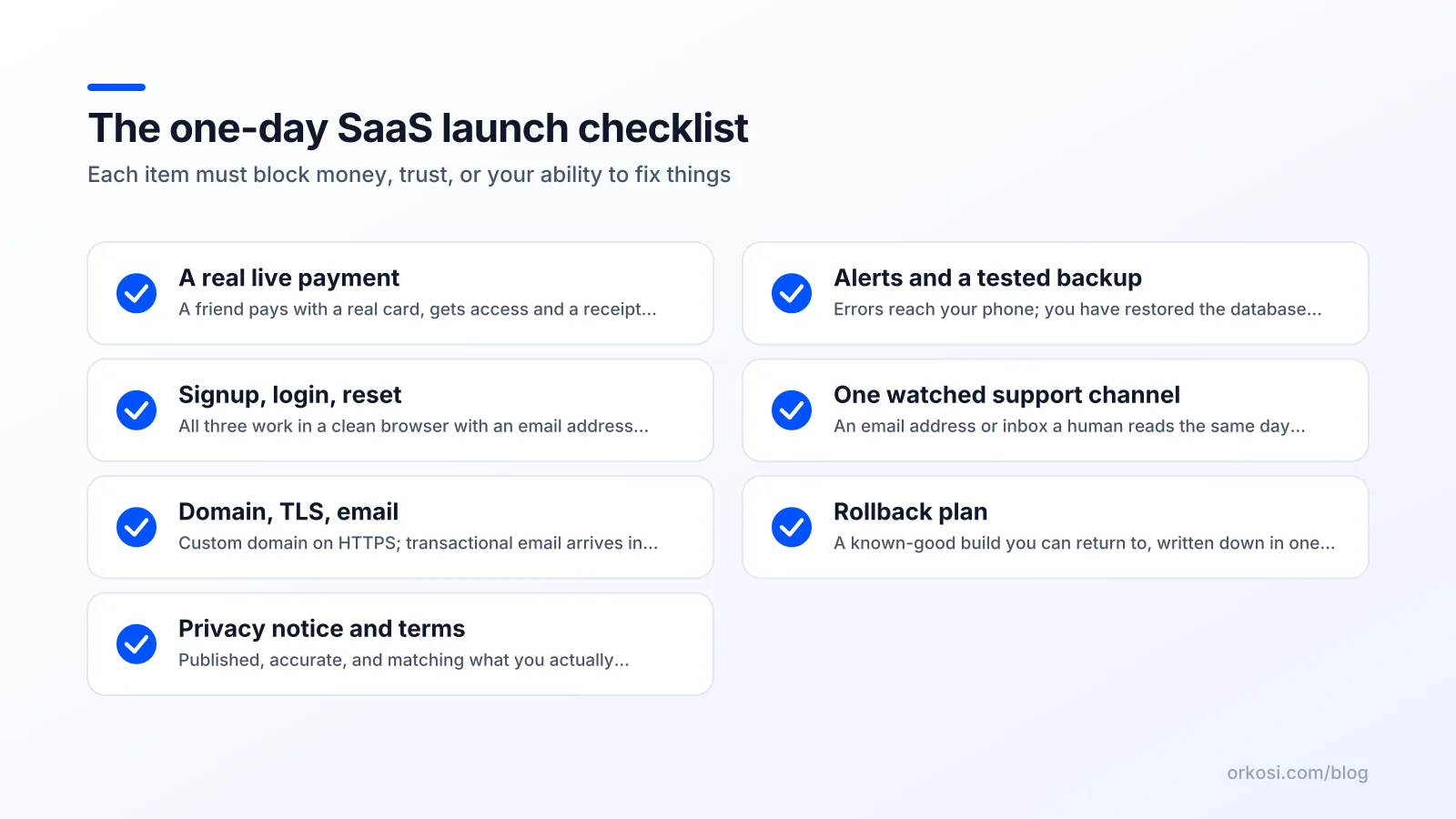
This is the core SaaS go-live checklist. Each gate has a definition of done you can verify, a rough time cost, and the specific failure it prevents.
1. A real payment with real money, by someone who isn't you
Done when: a friend, on their own device and their own card, completes a live-mode purchase; the receipt arrives; the account upgrades automatically without you touching anything; and you then issue a full refund from the dashboard.
Time: 20-30 minutes. Prevents: the single most expensive launch failure, charging someone and not granting access.
Test mode is not proof. Stripe's own testing documentation is explicit that test cards exercise your integration, not your live account configuration: live keys, webhook endpoints, tax settings and payment method availability are separate. A green test-mode checkout tells you your code compiles against the API, not that your live webhook secret is correct.
Run the refund too. If you cannot refund, you cannot defuse your first angry customer.
2. Signup, login, and password reset from a clean browser
Done when: in a fresh incognito window with no saved sessions, you complete signup with a real inbox, log out, log back in, then complete a password reset end to end including clicking the emailed link.
Time: 10 minutes. Prevents: the locked-out user. Password reset is the most commonly broken path in new products because the developer never needs it.
Do this on a phone as well as a laptop. Not a responsive-design audit, just: does the form submit.
3. Custom domain, TLS, and email that doesn't land in spam
Done when: the app serves over HTTPS on your own domain with a valid certificate, http:// redirects to https://, and a transactional email sent to a Gmail address and an Outlook address arrives in the inbox.
Time: 30-60 minutes, mostly DNS propagation. Prevents: certificate warnings on the pricing page, and password reset emails nobody receives.
SPF, DKIM and DMARC records are the difference between an inbox and a spam folder. This is the gate people skip because it is boring, and the skip I regret most. On an agent-run platform like Orkosi, hosting, the custom domain and TLS are part of the deploy rather than a separate afternoon of DNS and load balancer work, which collapses this gate into something you describe instead of assemble. You still own verifying inbox placement, because that depends on your sending domain reputation.
4. Privacy notice, terms, and an honest data inventory
Done when: both documents are linked in the footer and at signup, and you can write down, in one paragraph, every category of personal data you collect, why, and which third parties receive it.
Time: 45 minutes. Prevents: making claims you cannot keep, which is the trust failure with legal teeth.
If you have any EU or UK signups, GDPR Article 13 sets out what you must tell people at the point of collection: your identity, the purposes and legal basis for processing, recipients, retention period, and their rights. You do not need a law firm on day one. You do need the inventory to be true, which means knowing that your analytics script sets a cookie and your email provider stores addresses in the US.
5. Error alerts and database backups you have actually restored once
Done when: an unhandled server error produces a notification you will see within minutes, an automated daily database backup exists, and you have restored one backup into a scratch environment at least once.
Time: 45-60 minutes, the restore being most of it. Prevents: silent outages, and the discovery that your backups were never readable.
The AWS shared responsibility model draws the line clearly: the provider secures the infrastructure, you own your data, configuration and access management. Nobody is backing up your schema migration mistake for you. An untested backup is a belief, not a control.
6. One support channel a human watches
Done when: there is exactly one visible way to reach you (an email address is fine), it is checked at least twice a day, and a test message from an outside address reaches you.
Time: 10 minutes. Prevents: a paying customer hitting a bug and having nowhere to put it except a review site.
One channel, watched, beats four channels ignored. Skip the chat widget, the help centre and the ticketing system.
7. A written rollback plan and a known-good deploy
Done when: you have the identifier of the exact build currently running, a one-page note describing how to redeploy it, and you have practised reverting once.
Time: 20 minutes. Prevents: a bad deploy becoming a multi-hour outage while you improvise. Write it down; at 2am you will not remember the command.
Total: roughly five to six hours with buffer. That is the whole SaaS launch checklist.
What I deliberately skip on day one — and the cost of skipping it
SOC 2, load tests, and onboarding tours
Each deferral comes with the condition that makes it urgent. Deferral is not denial, it is scheduling.
| Deferred item | Becomes urgent when |
|---|---|
| SOC 2 / ISO 27001 | First enterprise prospect asks for the report |
| Load testing and autoscaling | Sustained traffic or first 1,000 users |
| Multi-region / failover | Revenue makes an hour of downtime genuinely expensive |
| SSO and SAML | First buyer with an IT department |
| Full analytics suite | Volume makes cohorts meaningful, roughly 100+ signups |
| In-app onboarding tour | You have heard the same confusion three times |
| Internationalisation | First non-English signup or payment in another currency |
| Native mobile app | Users tell you the web app is unusable on a phone |
The two skips I regret most often
Email deliverability. Products ship with reset emails silently landing in spam, and the founder reads the resulting churn as "people didn't want it". Also check compliance on anything resembling marketing: the FTC's CAN-SPAM guide requires honest headers and subject lines, a clear opt-out honoured within ten business days, and a valid physical postal address in commercial messages. Your launch announcement counts.
Cancellation and refunds. Shipping without a self-service cancel path is a bet that nobody will want to leave in week one. When they do, and the only exit is emailing you, you have manufactured a bad story about yourself. If you cannot build self-service cancellation in time, say so plainly on the pricing page and refund within a day of any request.
Both are trust gate failures, which is why they outrank almost everything in the deferred table.
Launch day is a 90-minute sequence, not a vibe

Here is a SaaS launch day plan that fits in an hour and a half.
T-60: freeze, deploy, smoke test
Stop changing code. Deploy the build you intend to launch, note its identifier, then run a five-step smoke test on the live site: load the homepage, sign up, log in, complete a live payment, log out. Five minutes, every time, no shortcuts because you ran it yesterday.
T-0: open the gate to 10 people
Invite ten strangers. Not friends who will forgive you, and not your whole mailing list. Ten people from a community, a waitlist or a Slack group who have mild interest and zero loyalty. Watch the error alerts and the first real payment land. Stay available for an hour.
T+60: watch logs, then widen
If the ten got through signup and at least one paid, publish publicly. If they did not, you have found your bugs with ten witnesses instead of two thousand. Big-bang announcements optimise for a single traffic spike and pay for it with reputational risk. The first ten strangers find most of the embarrassing bugs at roughly one percent of the audience, and the fix takes an afternoon nobody saw.
How AI-built products shift the checklist
Scope verification replaces hand-testing
When agents write and deploy the code, "will it build and deploy" stops being the interesting question. The interesting question becomes: does it do what I specified, and nothing I did not specify? Three passes matter more than anything else:
- Authorisation boundaries. Create two accounts. From account A, try to read, edit and delete account B's records by manipulating IDs in URLs and API calls. Multi-tenant leakage is the most damaging bug class in generated code, because it is invisible until it is catastrophic.
- Webhook idempotency. Send the same payment webhook twice. A customer should not be upgraded twice, charged twice, or emailed twice.
- Seeded test data. Generated apps often ship with sample users, demo products and placeholder copy. Grep production for "test", "lorem", "example.com" and your own email address.
Specs, not screenshots, are the launch artifact
The durable artifact is the written specification of what the product should do, because that is what you iterate against. On Orkosi the loop is tasks against a running product: you describe a change, agents implement and deploy it. A bug found at T+20 on launch day becomes a task, not a release cycle, which is the fixability gate made structural.
That is the honest trade-off with agent-built software. You give up line-by-line authorship and gain a cheap failure mode. The checklist's job was never to make failures impossible, only survivable and quick to reverse. The app templates cover SaaS and web apps, stores, sites and more, hosting and billing wiring included, and the docs describe how the task loop works. Credits and plan limits are on the pricing page.
The 30-day list: what graduates from 'skip' to 'must'
Same three gates, slower cadence.
Week 1: deliverability, cancellation, indexing
- Send a real onboarding sequence to a test inbox on Gmail, Outlook and Yahoo. Fix SPF/DKIM/DMARC gaps. Add the unsubscribe link and postal address.
- Ship self-service cancellation and a documented refund policy.
- Submit a sitemap. Google Search Central's sitemaps overview explains that sitemaps help discovery on larger or newer sites, which is exactly your situation, and also why this was never a launch-day blocker: indexing takes days to weeks regardless of when you submit.
- Rewrite the pricing page once you have heard the first three objections.
Weeks 2-4: analytics, docs, first security review
- Basic funnel instrumentation: landing page view, signup, activation, payment. Four events, not forty.
- A changelog, public. It is the cheapest retention tool there is.
- Backup restore drill number two, this time timed. If it takes more than an hour, improve it now.
- A dependency and secret rotation pass: update packages with known vulnerabilities, rotate any key that ever appeared in a chat log, screenshot or commit.
- A read-through of your own authorisation code, now that real tenants have real data in it.
FAQ
How long should a SaaS launch checklist take to complete?
One working day, roughly five to six hours, for a solo or two-person team. Each item should block money (a stranger can pay and get access), trust (your claims and data handling are honest), or fixability (you detect breakage and can revert it). Anything that fails all three gates belongs on a 30-day list. Multi-week launch checklists are built for teams with a release manager and a QA engineer, and copying one imports the overhead without the people.
Do I need terms and a privacy policy before my first paying user?
Yes, and the real work is the data inventory behind them rather than the document itself. If you have any EU or UK users, GDPR Article 13 requires you to tell people at the point of collection who you are, why you are processing their data, who receives it, how long you keep it, and what rights they have. Write down every data category and third party first, then make the notice match. A generated template describing a product you do not have is worse than a short, accurate page.
Should I launch with a free trial or charge from day one?
Charge from day one, even if the price is low, because the money gate is the only one that proves your billing works end to end. A real live-mode charge from someone else's card, with automatic access granted and a successful refund, tests your live keys, webhooks and entitlement logic in a way that Stripe test mode cannot. Trials are a pricing decision you can change next week. Broken billing discovered by a paying customer is a trust problem you cannot.
What's the single most common launch-day failure?
Email that never arrives. Password resets, receipts and verification links land in spam because SPF, DKIM and DMARC were never configured, and the founder interprets the resulting silence as lack of demand. Second place goes to payments that succeed while access is not granted, usually because the live webhook secret differs from the test one. Both are 30-minute checks that prevent the two failures users will not forgive.
Pick a template, describe the product, and let the agents handle hosting, domain, TLS and billing wiring so your launch day is seven gates instead of seventy. Start free and check the plans and credit details when you are ready to put a live charge through.